
 Margin Pro
 Retail 365
 AI Operator
 Seller 365
 UniCon
 Onsite Support


 Blog
Blog How to sell on TikTok Shop from Amazon.
Expanding from Amazon to TikTok Shop means adapting your catalog while keeping your operations intact. The challenge isn’t listing products. It’s maintaining alignment across both channels.

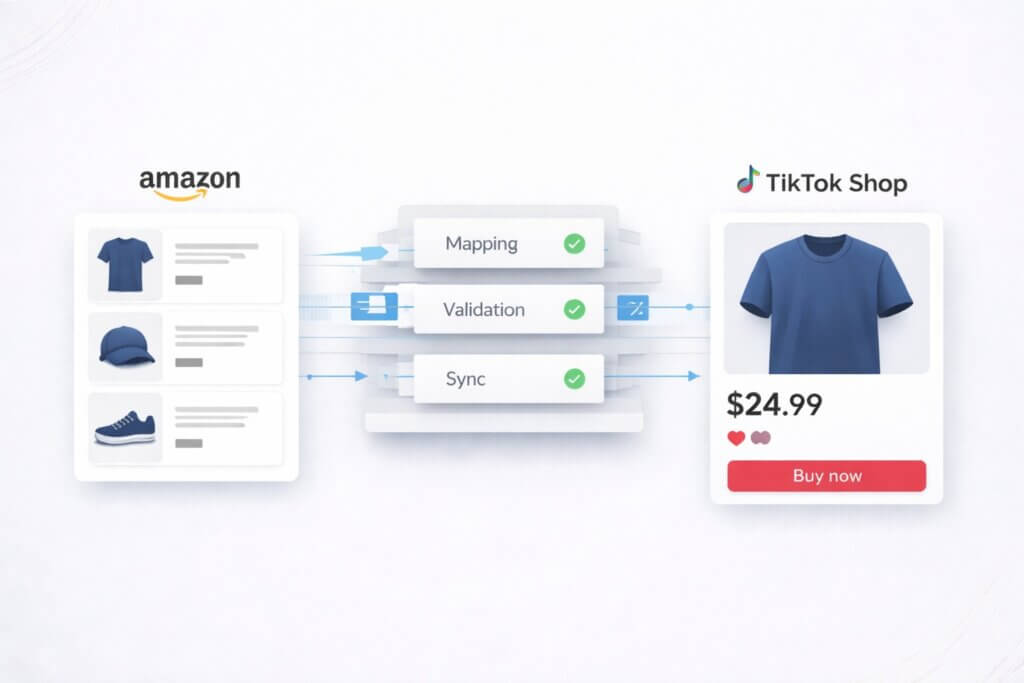
Expanding from Amazon to TikTok Shop means adapting your catalog to a completely different structure while keeping your operations intact.
The product data you already have won’t map cleanly. Categories, attributes, and variation logic all differ, and your inventory and order flow now need to stay consistent across two systems.
Despite this complexity, most sellers don’t fail at getting set up. They fail when listings, inventory, and fulfillment fall out of sync after launch.
To sell on TikTok Shop from Amazon, you need to:
- translate your catalog into TikTok Shop’s structure
- connect fulfillment, typically via MCF or a 3PL
- sync inventory in real time
- route orders and tracking correctly
The challenge isn’t listing products. It’s maintaining alignment across both channels.
Why TikTok Shop is worth adding.
TikTok Shop passed $15B in US GMV in 2025 and continues to grow quickly. It behaves differently from Amazon, with more discovery-driven and impulse-led buying. That makes it a useful incremental channel.
For Amazon sellers, most of the inputs already exist. Your catalog, images, and fulfillment setup are already in place.
The challenge is making that existing operation work in a second system with different rules.
Common challenges when selling on TikTok Shop from Amazon.
Creating compliant listings is the first issue, but it doesn’t stop there.
Amazon and TikTok Shop both use structured product data, but their schemas don’t align. Category trees are different. Required attributes are different. Variation logic doesn’t map cleanly. A listing that’s valid on Amazon can still be rejected on TikTok Shop.
That’s the first layer.
The second layer is ongoing operations. You now have two order streams pulling from one inventory pool, with fulfillment expected to work across both.
Listings can be fixed. Inventory drift and order handling issues compound over time.
How to list Amazon products on TikTok Shop.
To sell on TikTok Shop from Amazon, you first need to translate your catalog into TikTok Shop’s structure.
That means:
- mapping Amazon attributes to TikTok Shop attributes
- filling in fields TikTok requires that Amazon doesn’t
- adjusting listings to match TikTok Shop’s category rules and validation logic
Manual workflows rely on exports and spreadsheets. That works at small scale but becomes slow and fragile as SKU count grows.
Most sellers operating at scale use automation tools to handle this layer. The more capable systems map attributes based on meaning and category context, then validate listings against TikTok Shop’s current schema before submission.
CedCommerce by Threecolts is one example. It uses profile-based mapping, where you define rules once and reuse them across channels, with overrides only where needed. The system suggests mappings based on your catalog and the target marketplace, turning most of the work into review rather than manual setup.
This isn’t unique to TikTok Shop. Every marketplace has its own schema. Walmart enforces stricter listing quality standards, while SHEIN uses more prescriptive title and attribute structures. The underlying problem is the same: your Amazon catalog needs to be translated and maintained across systems.
Automated validation is the key. Without it, you end up in a cycle of rejections and rework.
How to fulfill TikTok Shop orders using Amazon MCF.
Once listings are ready, the next decision is fulfillment.
If you’re already using FBA, Amazon Multi-Channel Fulfillment (MCF) is the most direct option. TikTok Shop orders can be routed through Amazon’s fulfillment network using the same inventory.
The setup is mostly alignment. Carrier names, tracking formats, and delivery expectations need to match what TikTok Shop requires. If they don’t, tracking fails, and seller metrics take a hit.
Cost is the main tradeoff. MCF fees are typically higher than standard FBA, so it’s worth checking margins before rolling it out across your full catalog.
Some sellers use MCF as the default and keep a 3PL as a fallback for specific products or regions.
Managing multichannel fulfillment is an issue across every channel. On Temu, it’s compounded by longer return windows. On Walmart, it depends on whether you split or share inventory.
How to sync inventory between Amazon and TikTok Shop.
Inventory issues usually don’t show up immediately. They show up once both channels are active.
You now have two systems pulling from the same stock. If availability isn’t updated instantly, you oversell. That leads to cancellations and impacts performance.
The requirement is simple in theory: when something sells on one channel, it needs to reflect everywhere.
In practice, the implementation matters. Delayed updates create gaps. Weak error handling leaves inventory in the wrong state.
Systems like CedCommerce handle this continuously. Updates are processed in real time, failed operations are retried, and inventory stays aligned across both platforms.
Without that, discrepancies build quietly until they start affecting orders.
Managing order flow across both platforms.
Orders need to pass cleanly between TikTok Shop and your fulfillment setup.
Each order has to be captured, sent to the correct fulfillment source, and returned with tracking in the format TikTok expects.
The failure cases are where problems start. Orders can stall before reaching fulfillment, fail to return tracking, or get stuck between systems.
These issues aren’t always obvious at the time. They tend to appear later as delayed shipments or drops in performance metrics.
CedCommerce addresses this by retrying failed orders automatically and surfacing anything that needs attention.
Without that layer, order handling turns into manual checking across systems, which doesn’t hold up once volume increases.
What to launch first.
Don’t start with your full catalog.
Start with 100–200 SKUs. Focus on products with clean data, strong images, and clear use cases. This limits risk while you validate that listings, inventory sync, and fulfillment all work together.
You’ll surface issues early: missing attributes, category mismatches, tracking inconsistencies.
Once those are resolved, expanding the catalog is straightforward. The mapping rules, sync logic, and routing are already in place.
A realistic timeline.
For sellers using automated mapping and MCF, a typical rollout looks like:
Days 1–2: Connect systems and import your catalog. Review attribute mappings.
Days 3–5: Configure TikTok Shop requirements and fulfillment settings. Fill missing attributes.
Days 5–7: Submit initial listings and resolve validation issues.
Days 7–10: Listings go live. Validate inventory sync, order routing, and tracking end-to-end.
The timeline depends on your catalog size and category complexity, but most delays come from mapping edge cases, not from connecting systems.
What this comes down to.
TikTok Shop doesn’t require new products or new infrastructure. It requires your existing system to work in a different format.
Your catalog, inventory, and fulfillment are already in place. The challenge is keeping them aligned across two platforms that operate differently.
The sellers who succeed treat this as a coordination problem. They translate their data correctly, keep inventory accurate, and ensure orders move cleanly between systems.
Once that’s working, expansion becomes repeatable. Without it, small inconsistencies compound quickly.