


 Blog
Blog What is Amazon IPI and why it matters for FBA sellers
Amazon tracks how well you manage inventory and uses it to decide how much space you get.


Your FBA storage privileges hang in the balance of a three-digit number you might not even be tracking. The Amazon Inventory Performance Index (IPI) score determines whether you can send unlimited inventory to Amazon’s warehouses or get slapped with storage restrictions that can cripple your business growth.
Understanding your IPI score isn’t just helpful—it’s essential for any serious FBA seller. Miss the threshold, and you’ll find yourself rationing inventory space while competitors stock up for peak seasons. Get it right, and you unlock the full potential of Amazon’s fulfillment network.
All about the Amazon Inventory Performance Index (IPI)
The IPI works like a report card for how well you handle your FBA inventory. Amazon grades you on a scale that helps them decide whether you get unlimited storage space or need tighter restrictions on how much you can send to their warehouses.
Amazon created this system because too many sellers were clogging up fulfillment centers with products that weren’t moving. When warehouses get stuffed with slow-selling items, it creates problems for everyone. Amazon’s costs go up, and sellers who need space for fast-moving products can’t get it.
Your score comes from Amazon looking at both your recent performance and your long-term track record. This means when you make changes to improve your inventory management, you won’t see the score jump immediately. Amazon built in this delay on purpose so that seasonal fluctuations or unexpected business disruptions don’t tank your score overnight.
The scoring system considers multiple elements, but the biggest factors are things you can directly control. You need to keep the right balance between having enough inventory to meet demand without overstocking. You also need to prevent your products from sitting too long and avoid situations where your inventory can’t be sold due to listing issues.
What influences your IPI score?
Amazon breaks down your inventory performance into four main areas, each with its own performance meter that shows how you’re doing. These meters range from excellent performance down to poor, with color coding to make it obvious where you stand.
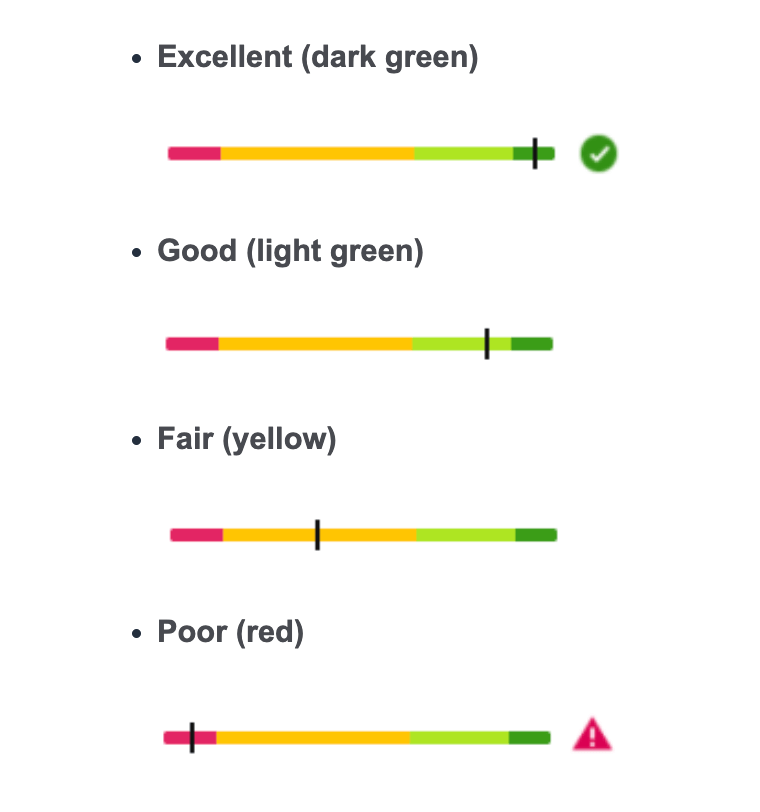
Excess inventory tracking looks at products where you have way more stock than Amazon thinks you’ll sell. Amazon flags items as excess when its system calculates you have more than three months’ worth of supply sitting in warehouses. The dashboard shows you exactly how many units are considered excess and estimates what it’ll cost you in storage fees if you don’t take action.
Stranded inventory monitoring catches products that can’t be purchased because something’s wrong with the listing. These items still take up space and cost you storage fees, but they generate zero sales because customers can’t buy them. Common problems include missing product details, pricing mistakes, or listings that got suppressed for policy violations.
Sell-through rate measurement tracks how quickly you move products compared to how much inventory you keep on hand. Amazon calculates this by looking at your sales over the last three months and comparing that to your average inventory levels during the same period. This metric helps identify when you’re holding too much or too little stock.
Stock availability tracking measures how well you keep your best-selling products available for customers. Amazon weights this calculation based on how much each product typically sells, so running out of your top performers hurts this metric more than stockouts on slower-moving items. You can exclude products you don’t plan to restock from this calculation.
How your IPI score affects your Amazon business
Your IPI score directly determines how much inventory Amazon lets you store in its fulfillment centers. Better scores earn you higher storage limits, while poor scores can severely restrict how much you can send in.
Amazon gives you advance warning before implementing storage restrictions. They’ll notify you several weeks ahead of time about what threshold you need to meet and which specific weeks they’ll use to evaluate your score. This gives you time to address any issues before restrictions kick in.
When your inventory management suffers, you’re more likely to get hit with expensive long-term storage fees. These fees apply to products that sit in Amazon’s warehouses for over a year, and they can sometimes cost more than the products themselves are worth.
Storage restrictions create a cascading effect on your business. When you can’t send enough inventory to meet demand, you’ll face more frequent stockouts, which can hurt your visibility in search results and reduce your chances of winning sales.
How to improve your IPI score
Boosting your IPI score requires a systematic approach that addresses each of the four key measurement areas. The goal is to maintain consistent, data-driven inventory practices rather than making knee-jerk reactions when scores drop.
Manage excess inventory effectively
The sweet spot for inventory levels is typically one to two months’ worth of expected sales. This gives you enough buffer to handle demand spikes without triggering Amazon’s excess inventory flags.
Amazon provides a built-in solution called Outlet for moving overstock items. When you have products eligible for this program, Amazon will show you a recommendation to create an outlet deal. This lets you clear excess inventory at discounted prices without completely destroying your regular pricing structure.
You can also use Amazon’s multi-channel fulfillment service to sell your FBA inventory through other sales channels like your own website. This effectively improves your turnover rate from Amazon’s perspective since inventory is leaving their warehouses.
When storage costs will exceed what you can recover through sales, removal orders become the smart financial choice. Calculate the total cost of keeping slow-moving inventory in storage for a full year, including monthly fees and potential long-term charges.
Optimize your sell-through rate
Inventory management is all about finding the right balance. Too much inventory means you’re tying up cash and paying storage fees on products that aren’t moving. Too little means you’ll run out of stock and miss sales opportunities.
When your sell-through rate is low, you have two main options: boost sales or reduce inventory levels. For increasing sales, you can adjust pricing, run promotions, improve your product keywords, or use Amazon’s advertising tools. For reducing inventory, you can remove slow-moving stock or sell it through other channels.
If your sell-through rate is extremely high, it might indicate you’re running too lean on inventory. This can lead to stockouts that hurt customer experience and your search rankings. In these cases, you’ll want to increase your restock quantities and order more frequently.
Fix stranded inventory immediately
Stranded inventory is like having a leaky faucet. It costs you money every day without any possibility of generating revenue. These products accumulate storage fees while contributing nothing to your sales metrics.
The key is catching stranded inventory problems quickly. Most issues can be resolved within a day or two once you identify them. Common fixes include updating product information, adjusting pricing, or addressing policy violations that caused listings to be suppressed.
Amazon provides an automatic removal option for aged inventory that you can set up in your account. This helps prevent products from reaching the one-year mark where long-term storage fees kick in.
Maintain healthy stock levels
Keeping your best-selling products in stock requires balancing your cash flow against inventory velocity. The goal is to avoid stockouts on products that drive most of your revenue while not overstocking slower-moving items.
Amazon’s restock recommendations provide a good starting point, but you’ll need to adjust based on your specific lead times and business patterns. The system shows you which products are at risk of running out before you can get new inventory to the warehouse.
For products you don’t plan to restock, you can hide them from the restock recommendations. This keeps your in-stock rate calculation focused only on products where stockouts actually matter to your business.
Tools that help optimize inventory performance
Amazon provides several built-in tools through your seller dashboard to help manage inventory performance. The main inventory performance page gives you detailed metrics for each of the four scoring factors, with links to specific tools for addressing problems.
The inventory health management tool provides specific recommendations for improving your performance. You can sort and filter your inventory to focus on products with the biggest opportunities for improvement.
The stranded inventory tool shows you exactly which products have listing problems and guides you through fixing them. Most sellers can resolve these issues quickly once they know what to look for.
Amazon’s restock recommendations help you identify products that need attention before they run out of stock. The system considers your sales velocity and current inventory levels to suggest optimal reorder timing.
There are also third-party apps to consider. InventoryLab’s Restock Report takes inventory management beyond Amazon’s basic tools by tracking products you regularly replenish and helping you avoid both stockouts and overstock situations. The report analyzes your sales patterns and automatically calculates when you need to reorder based on your specific lead times and safety stock preferences.
The system provides detailed forecasting that shows exactly how many units you should order and when to place those orders to maintain optimal inventory levels. You can customize the report to focus on different timeframes, exclude outliers that might skew your data, and filter by specific product categories or fulfillment channels.
InventoryLab’s integration with your existing inventory data means the restock recommendations factor in your actual costs, profit margins, and sales velocity rather than Amazon’s generic suggestions. This helps you maintain the precise inventory balance needed to keep your IPI score in the healthy range while maximizing your cash flow efficiency.
Common IPI score mistakes and how to avoid them
The biggest IPI mistakes usually come from treating inventory management as an afterthought rather than a strategic priority. Since your score reflects both recent and long-term performance, consistent good habits matter more than occasional perfect months.
New products get a grace period where they don’t affect your IPI score for their first three months. This lets you test new items without immediately hurting your score if demand doesn’t meet expectations.
When you submit removal orders or liquidation requests, those products immediately stop counting toward your IPI calculation. However, keep in mind that all inventory actions take time to reflect in your score updates, so don’t expect immediate improvements.
The most successful sellers treat their four IPI metrics like vital signs for their business, checking them regularly and addressing problems before they become serious issues.
Frequently asked questions about IPI scores
How does Amazon calculate the sell-through rate?
Amazon updates this metric daily using your sales from the past three months compared to your average inventory during that same period. They calculate your average inventory by taking snapshots at 30-day intervals and averaging those numbers.
For example, if you sold 120 units over three months and your average inventory was 80 units, your sell-through rate would be 1.5 (120 divided by 80).
Do new products immediately affect my score?
No, Amazon gives new products a 90-day grace period where they don’t impact your IPI calculation. This prevents new product launches from hurting your score while you’re still figuring out demand.
What happens to the removed inventory in my score?
Once you submit a removal or liquidation order, that inventory no longer counts toward your IPI. However, remember that score updates aren’t immediate—it takes time for these changes to show up in your metrics.
Why might I not have an IPI score?
You need a Professional selling plan, current inventory in Amazon’s warehouses, and recent selling activity to get an IPI score. New sellers or those who haven’t been active recently may not have a score until Amazon has enough data to calculate one.
Key takeaways for maintaining a healthy IPI score
IPI scores are only available to Professional plan sellers, so you’ll need to upgrade from an Individual plan to access these metrics and tools. Amazon designed the system to reward consistent, long-term good inventory management rather than short-term perfection.
The key to maintaining good performance is staying in the “green” range across all four metrics throughout the year. This balanced approach helps you avoid both excess inventory problems and stockout situations that can hurt your score.
Regular monitoring of your inventory metrics helps you spot problems before they become serious score-killers. The time you invest in staying on top of these numbers prevents much bigger headaches down the road.
Ready to take control of your inventory performance? Try Seller 365 free for up to 14 days and get the complete toolkit used by successful sellers worldwide. One of its apps, InventoryLab, can give you the visibility and control you need to maintain healthy IPI scores while scaling your Amazon business.