Threecolts Threecolts
PricingPricing
Log In Log In Get Started Get Started
  • Margin Pro
  • Retail 365New
  • AI OperatorNew
  • Seller 365
  • UniCon
  • Onsite Support
  • Online Arbitrage
  • Retail Arbitrage
  • Wholesale
  • BrandsNew
  • 1P Vendors
  • 3P Sellers
  • Blog
  • Knowledge Base
  • Threecolts University
  • Wall of Love
Pricing
Log In Log In Get Started Get Started
Margin Pro Find and recover margin lost to deductions, fees, and overcharges. Retail 365New One connected view of your Amazon Vendor P&L. AI OperatorNew Automate routine seller operations with an always-on AI teammate. UniCon Launch and manage your catalog on major marketplaces. Onsite Support Turn every support ticket into an operational workspace.
Seller 365 Run your entire seller operation with ten tools in one subscription.
  • InventoryLab
  • Tactical Arbitrage
  • FeedbackWhiz Emails
  • FeedbackWhiz Alerts
  • FeedbackWhiz Profits
  • SmartRepricer
  • InventoryLab Accounting
  • ScoutIQ
  • Scoutify
  • ScoutX
Business model
  • Online Arbitrage
  • Retail Arbitrage
  • Wholesale
  • BrandsNew
Fulfillment model
  • 1P Vendors
  • 3P Sellers
Services
  • Vendor Recovery
  • Seller Reimbursements
  • Carrier Optimization
Case Study David Protein’s frictionless expansion story. Case Study How Acquco recovered $3M in hidden margin. Case Study How Modway saved $2.7M with zero risk.
Learn
  • Blog
  • Podcasts
  • Knowledge Base
  • Threecolts University
Connect
  • About Us
  • Wall of Love
  • Seller Advocacy
Become an
Agency Partner
Join Now
Join the
Affiliate Program
Join Now
★★★★★ 4.5 ★★★★★ 4.9 ★★★★★ 4.6

Blog

  • Blog
  • Margin Pro

How to download invoices from UPS.

Getting 1-3 months of UPS invoices is the first step in saving 10-30% on shipping with Margin Pro. Here’s how to download your UPS invoices.

Gary Neale

  • 2 min read
  • May 14 2025
  • May 14

  • 7
UPS logo

The first step towards saving 10-30% on shipping with Margin Pro is to get 1-3 months of invoice data from your shipping carrier. But how do you download invoices from UPS?

This step-by-step guide shows you how to find and download all your UPS invoices.

(Shipping through FedEx rather than UPS? Check out our guide to downloading FedEx invoices.)

6 steps to download invoices from UPS.

To download your invoices from UPS, simply log into your account and follow the 6 steps below.

1. Select “View & Pay Bill”

Navigate to your account menu dropdown and select the “View & pay bill” option.
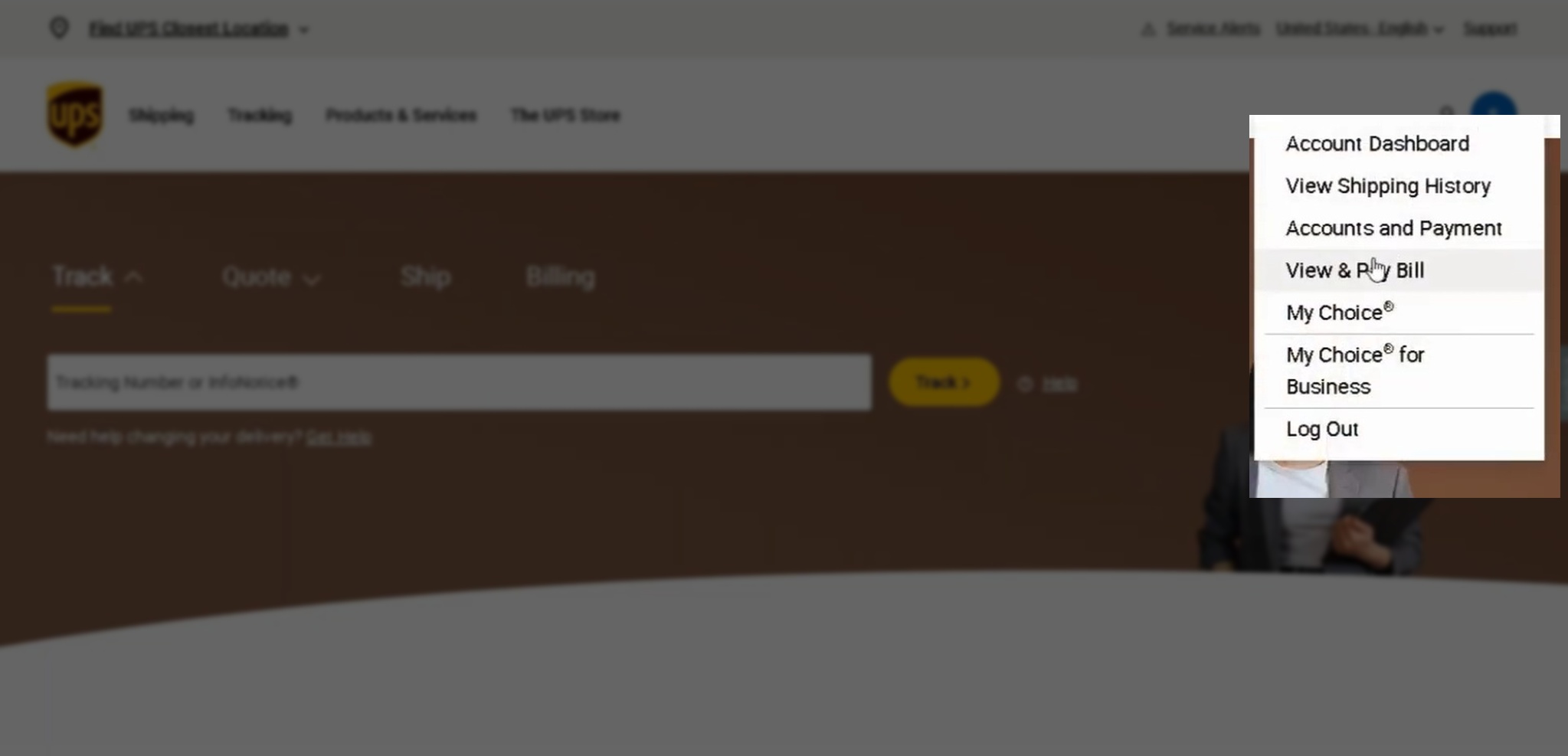
Screenshot of the UPS homepage highlighting where to choose "View & Pay Bill" in the My Account dropdown menu in the right of the main navigation.

2. Select “My Invoices”

Head over to the sidebar menu on the left and select the “My Invoices” option.
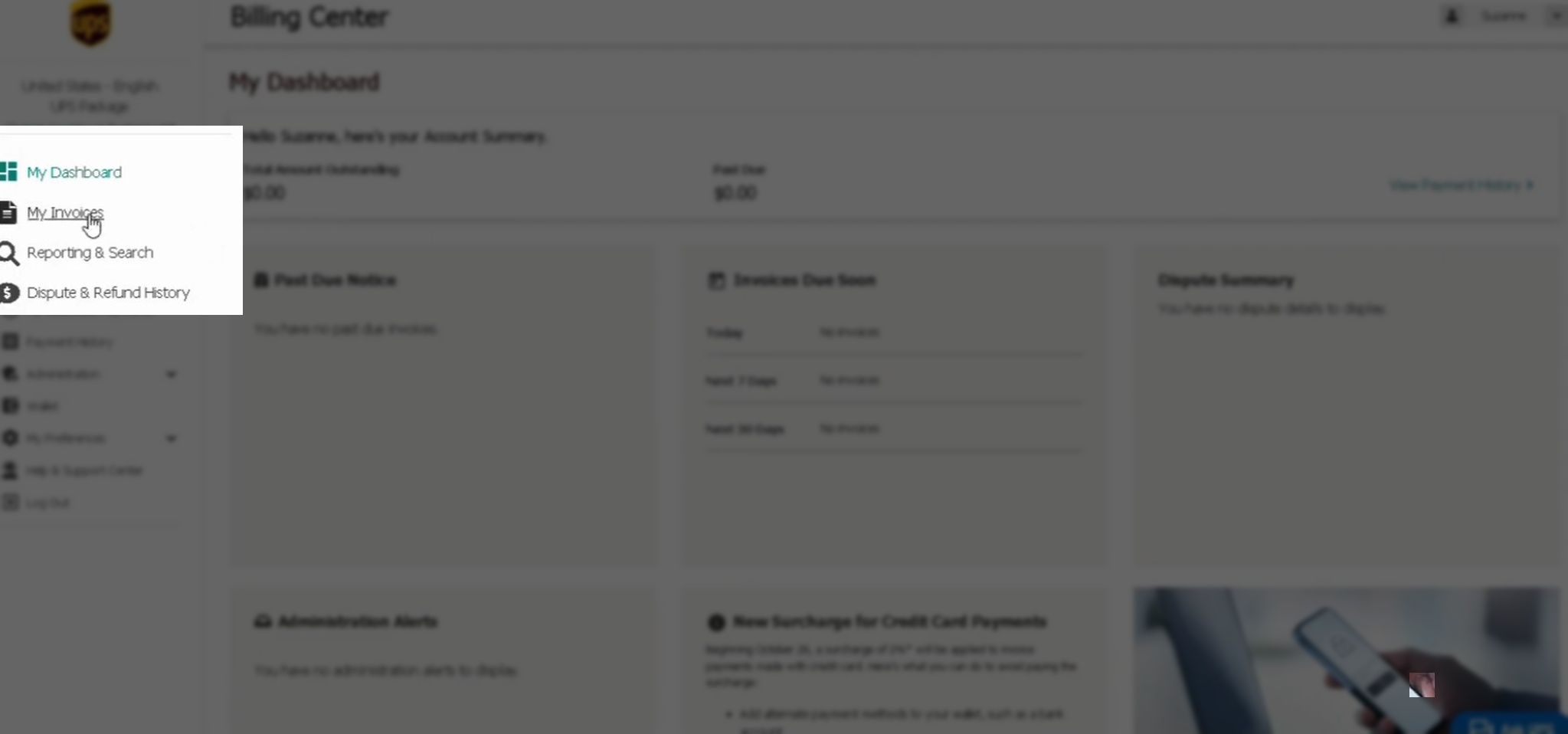
Screenshot of the UPS Billing Center dashboard showing how to navigate to "My Invoices".

3. Select each invoice you want to download

Use the check boxes to select each invoice you want to download. Margin Pro will need one to three months of recent invoices.

UPS only lets you download 10 invoices at a time, so if you need more, you’ll have to do this in batches.
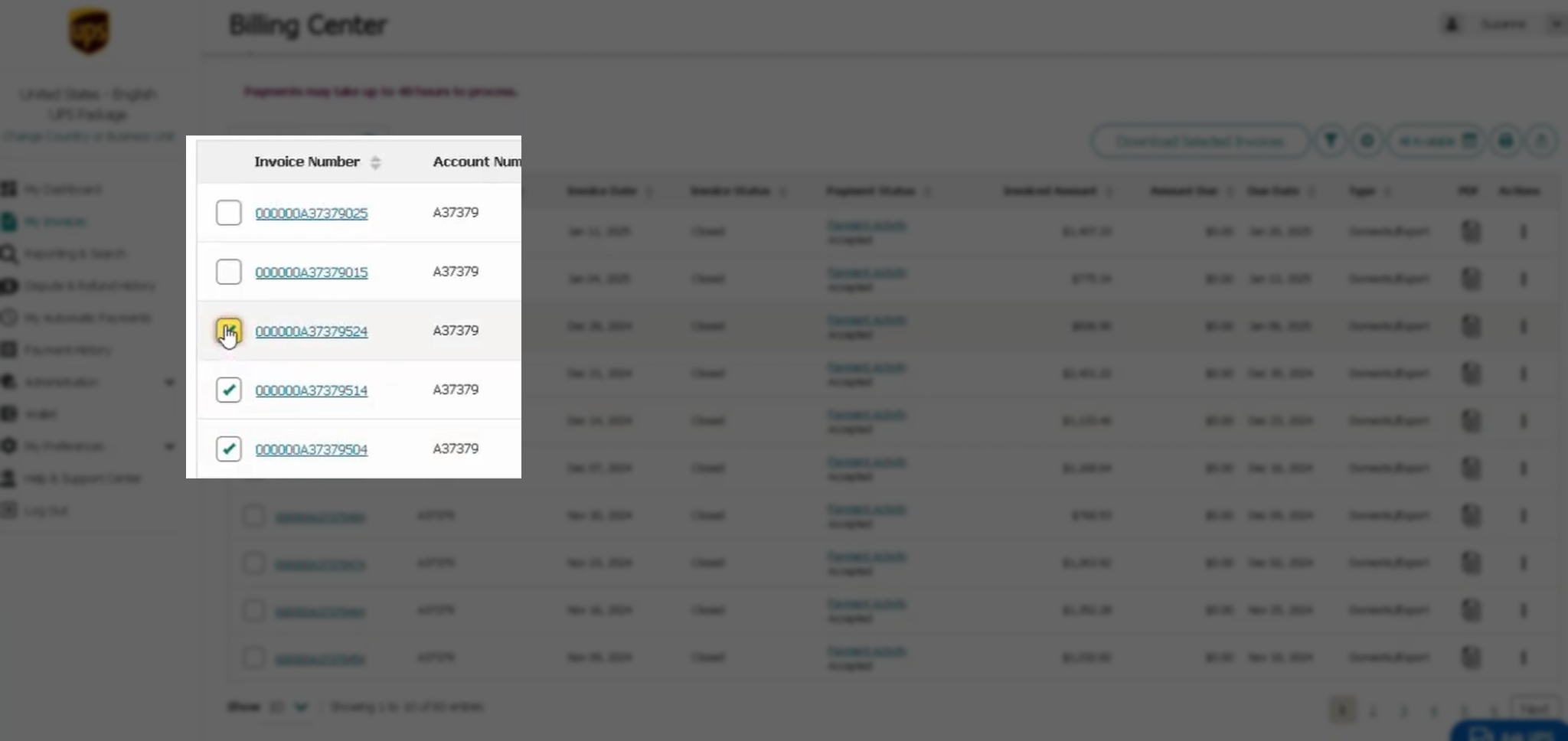
Screenshot of the UPS Billing Center showing how to select the invoices you want to download.

4. Hit “Download Selected Invoices”

Once you’ve selected all the invoices you want to download, use the “Download Selected Invoices” button at the top of the table.
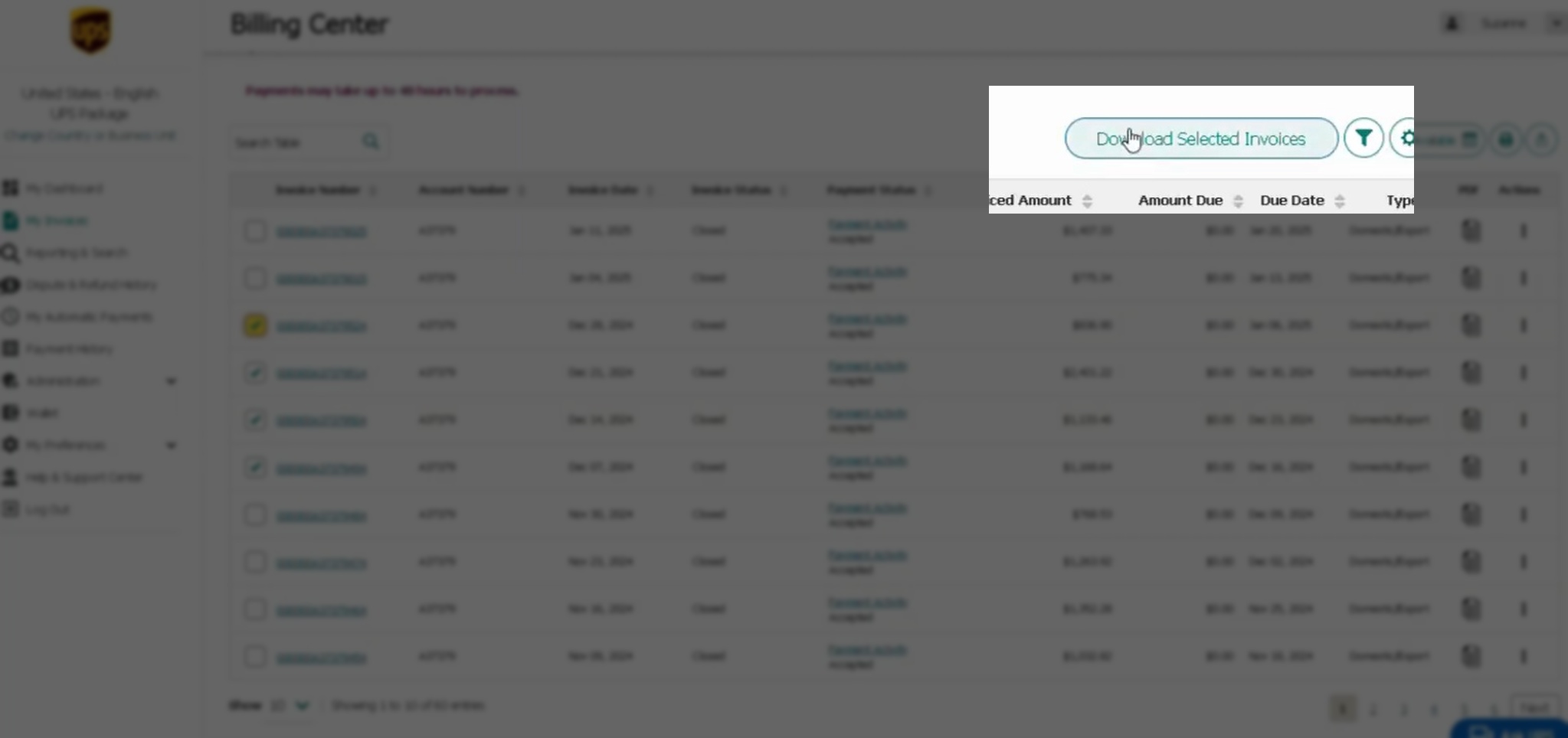
Screenshot of the UPS Billing Center highlighting where to select "Download Selected Invoices" in the top right of the screen.

5. Choose the “CSV: Full” format

In the pop-up that appears, choose the “CSV: Full (250 Columns)” format to ensure all your UPS invoice data is included. Then click download at the bottom of the pop-up.
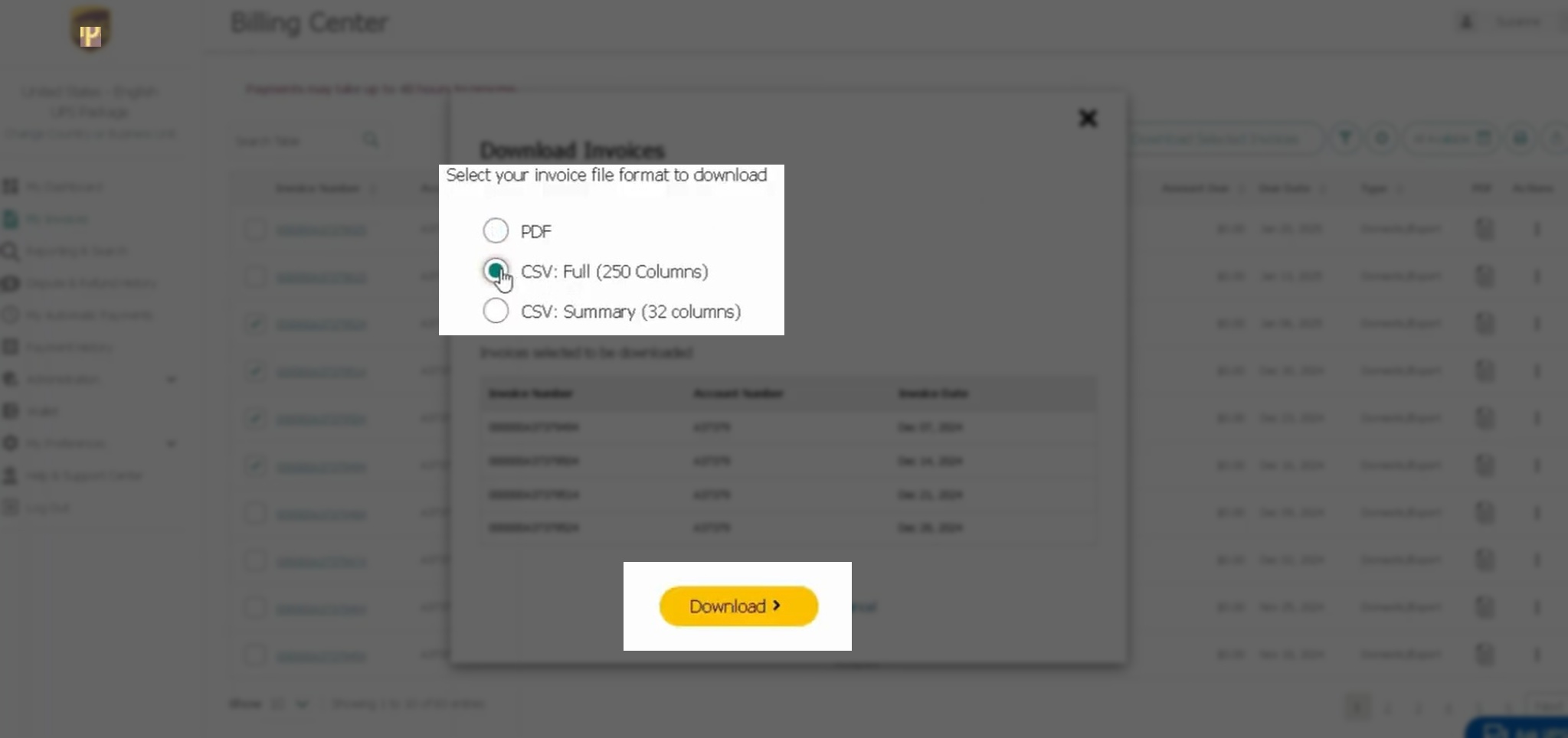
Screenshot of the UPS Billing Center showing where to select "CSV: Full (250 Columns)" before downloading a set of invoices.

6. Rename the downloaded file

Once your invoices have been downloaded, find the file in your computer’s Downloads folder and rename it to “YourCompanyName_DateRange”.

That’s it. You now have a single file with all your UPS invoice data. Simply share it with your Margin Pro account manager along with your shipping contract, and we’ll run our free, no-obligation audit. You’ll know exactly how much you could save on shipping within 48 hours.

Table of contents


  • 6 steps to download invoices from UPS.
  • 1. Select “View & Pay Bill”
  • 2. Select “My Invoices”
  • 3. Select each invoice you want to download
  • 4. Hit “Download Selected Invoices”
  • 5. Choose the “CSV: Full” format
  • 6. Rename the downloaded file

Maximize profits with Margin Pro

Recover marketplace fees and reduce shipping costs.

Get Started

Maximize profits with Margin Pro

Recover marketplace fees and reduce shipping costs.

Get Started
Continue reading...
  1. Austin Winterberg
    Is your inbound inventory actually protected?

    When Amazon loses your inbound inventory, don’t let your profit disappear with it.

    Mar 2

    41
    Amazon inbound inventory - High warehouse shelves stocked with cardboard boxes and pallets
  2. Gary Neale
    Amazon just changed its shortage claims process. Here’s what vendors need to know.

    Amazon has ended bulk shortage claims. Vendors now face stricter limits and more work. If you sell directly to Amazon, this shift could have a serious impact on your profit margins.

    Aug 26

    5
    Man sitting a desk surrounded by Amazon boxes while reviewing shortage claims documents.
  3. Kennedell Amoo-Gottfried
    Why margin leakage keeps happening in ecommerce.

    Margin leakage isn’t usually caused by a single failure. It builds over time. Here’s why.

    Mar 20

    3
    A man sat at his desk reviewing sales revenue on his laptop
  4. Gary Neale
    Best Amazon reimbursement service 2025: Recover lost profits automatically.

    Discover the best Amazon reimbursement service with Threecolts Margin Pro. Automate audits, claims, and follow-up—no effort, no upfront cost. Book your free audit today.

    Jul 30

    4

Trusted by the best.
Find out why.

Get Started Get Started Book A Strategy Session Book A Strategy Session
Threecolts

Products

  • Margin Pro
  • Retail 365New
  • AI OperatorNew
  • UniCon
  • Seller 365
    • InventoryLab
    • Tactical Arbitrage
    • FeedbackWhiz Emails
    • FeedbackWhiz Alerts
    • FeedbackWhiz Profits
    • SmartRepricer
    • InventoryLab Accounting
    • ScoutIQ
    • Scoutify
    • ScoutX

Solutions

  • BrandsNew
  • Online Arbitrage
  • Retail Arbitrage
  • Wholesale
  • 1P Vendors
  • 3P Sellers

Services

  • Vendor Recovery
  • Seller Reimbursements
  • Carrier Optimization

Resources

  • Blog
  • Podcasts
  • Knowledge Base
  • Threecolts University

Partner

  • Partner Program
  • Affiliate Program

Company

  • About Us
  • Careers
  • Seller Advocacy
  • Wall of Love
  • Legal
Follow us:
System status © 2026 Threecolts. All rights reserved.