

 Margin Pro
 Retail 365
 AI Operator
 Seller 365
 UniCon
 Onsite Support


 Blog
Blog How to get started with Tactical Arbitrage’s Wholesale Search: The ultimate guide
Manual wholesale sourcing takes hours. Tactical Arbitrage’s Wholesale Search cuts it to minutes. Here’s how to get started.

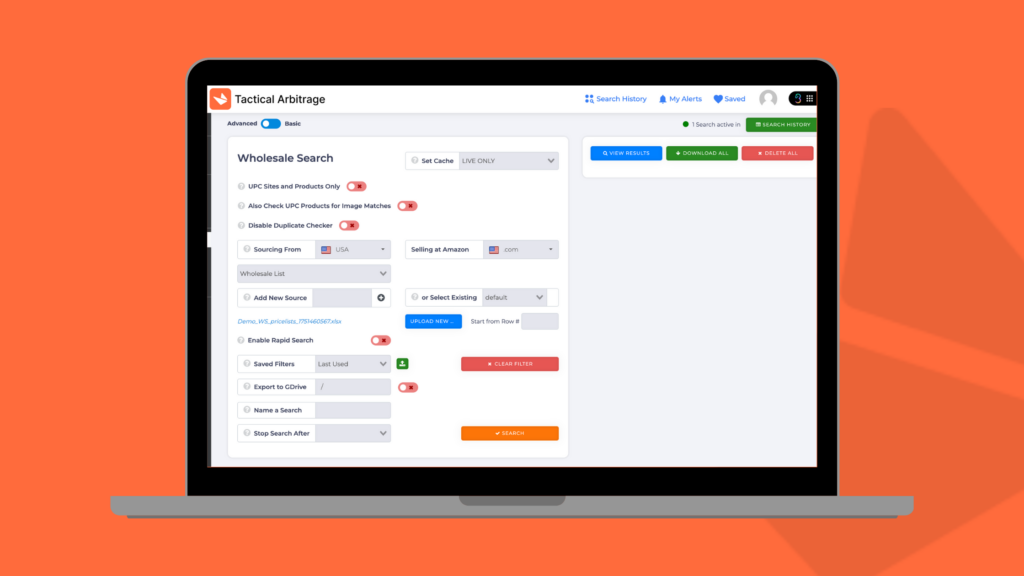
Most Amazon sellers hit a growth ceiling with retail arbitrage. You can only visit so many clearance aisles before you run out of time, energy, or profitable products. That’s where wholesale sourcing comes in: buying directly from suppliers at volume discounts to secure consistent inventory and margins.
But wholesale sourcing has its own challenges. Sorting through lengthy supplier catalogs and calculating potential profits across hundreds or thousands of products quickly becomes overwhelming. That’s exactly why we built Wholesale Search into Tactical Arbitrage.
This powerful tool lets you upload supplier manifests, apply customized filters, and identify profitable opportunities in minutes instead of hours. Let’s dive into how it works and how you can start using it today.
What is Wholesale Search?
Wholesale Search is a feature within Tactical Arbitrage that analyzes supplier product lists (manifests) to find items worth selling on Amazon. It compares wholesale costs against current Amazon prices while factoring in all associated fees and expenses.
The tool offers two different views to match your experience level:
Basic View: Perfect for beginners or straightforward searches. Provides essential filtering options with a streamlined interface for quick results.
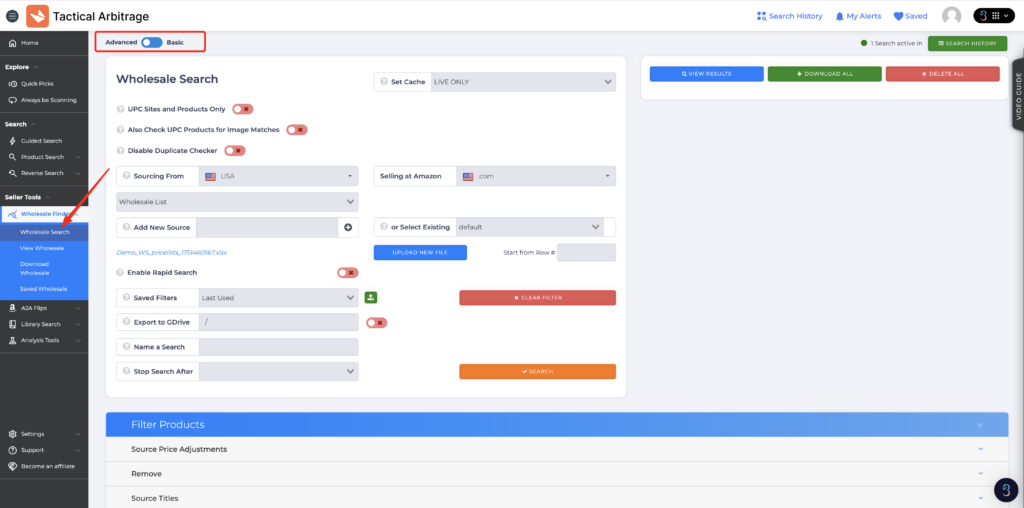
Advanced View: Offers more sophisticated filtering options, multiple sourcing methods, and granular control for experienced sellers or complex searches.
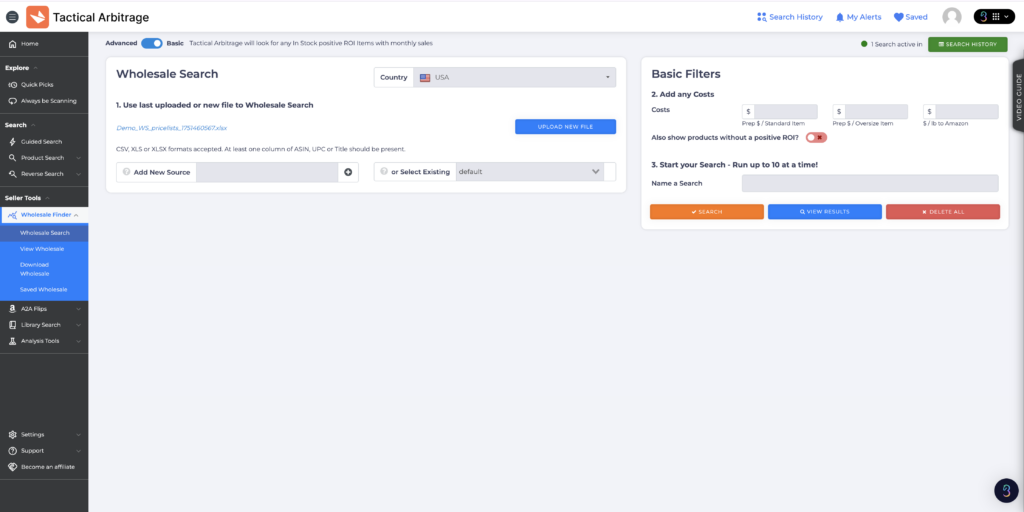
What sets Wholesale Search apart from manual analysis or basic scanning tools is its ability to:
- Process thousands of products in minutes
- Apply custom pricing adjustments that reflect real-world scenarios
- Factor in all Amazon fees and selling costs automatically
- Save successful search parameters for future use
- Organize results by profitability, ROI, or other key metrics
How to set up your first Wholesale Search on Tactical Arbitrage
Setting up your first wholesale search is straightforward, but it requires some preparation.
First, you’ll need a spreadsheet from a supplier. At a minimum, this list should include:
- Product titles
- UPCs (Universal Product Codes)
- Wholesale prices
Some lists might also include ASINs (Amazon Standard Identification Numbers), which can improve matching accuracy.
Your file should be formatted as a CSV, XLS, or XLSX, with each data point in its own column.
Pro tip: Check your UPC format before uploading. Valid UPCs need to be exactly 12 digits. Sometimes, supplier lists contain 11-digit UPCs (like 21200011139) that need to be reformatted with a leading zero (021200011139). Taking a few minutes to fix UPC formatting issues before uploading can save you troubleshooting time later.
Now, you’re all set for the uploading process itself!
1. Navigate to Wholesale Search in the Tactical Arbitrage sidebar menu. Choose either Basic or Advanced view (start with Basic if you’re new).
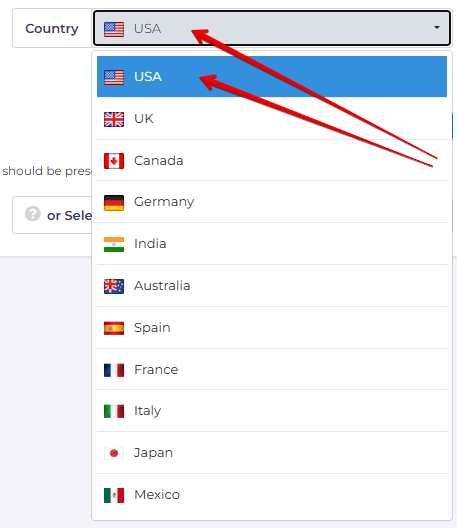
2. Select your sourcing country and the target Amazon marketplace.
3. Click “Upload New File” and select your wholesale list from your computer. Identify the row containing your column headers. Map each column to the appropriate data type (Title, UPC, Price, ASIN).
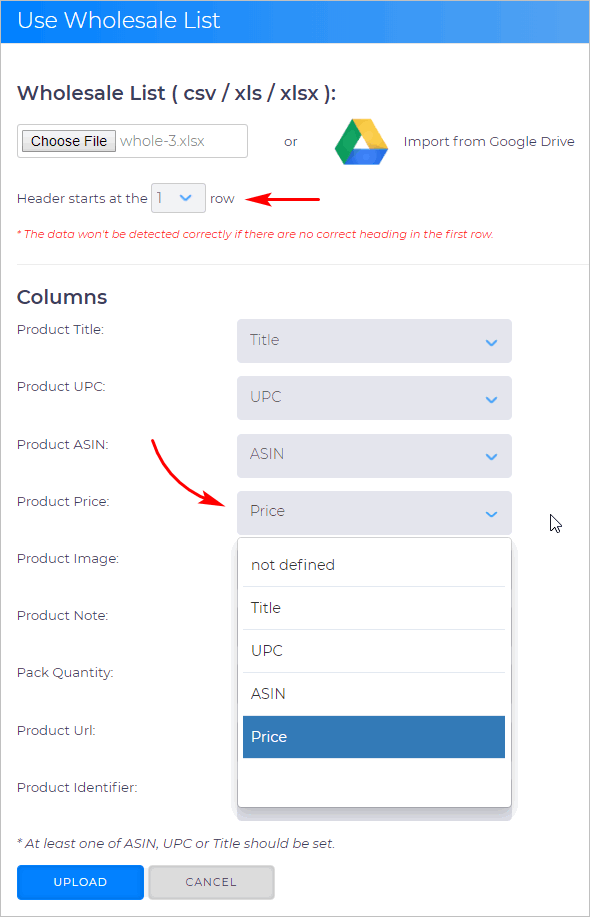
4. Add an identifier for your supplier (optional but recommended).

5. Apply filters (more on this below).
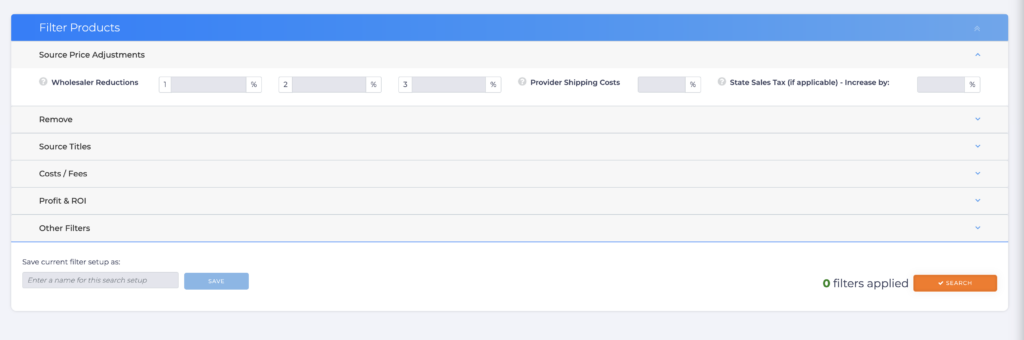
6. Name your search and click the “Search” button.
The system will then process your file, matching products to Amazon listings and calculating potential profits based on your filters.
Mastering Wholesale Search filters
The true power of Wholesale Search lies in its filtering capabilities. These filters help you zero in on truly profitable opportunities while avoiding duds.
Source price adjustments
Suppliers often offer additional discounts beyond the listed prices in their catalogs. Wholesale Search lets you factor these in:
- Wholesale Reductions: Enter percentage discounts negotiated with your supplier
- Cashback Percentage: Add cashback from credit cards or supplier programs
- Gift Card Percentage: Include savings from discounted gift cards
For example, if your supplier offers a 5% discount for orders over $1,000, you can enter “5” in the Wholesale Reductions field to adjust all prices automatically.
Provider shipping costs
Most suppliers charge for shipping, which impacts your true cost of goods. This filter allows you to add a percentage to account for these shipping charges.
If you know your typical shipping cost is about 3% of your product cost, enter “3” in this field to include it in profit calculations.
Sales tax considerations
Unless you have tax-exempt status, you’ll likely pay sales tax on wholesale purchases. Enter your local tax rate to ensure accurate profit projections.
Cost data for accurate ROI
Beyond the product cost itself, several other expenses impact your bottom line:
- Prep Cost Per Item: The cost to prepare each item for Amazon FBA
- Shipping Cost Per Pound: Your average cost to ship items to Amazon
- Inbound Shipping Cost Per Item: Alternative flat-rate shipping calculation
These fields help create a complete picture of your true costs, leading to more accurate ROI calculations and better buying decisions.
Some advanced strategies for wholesale
Once you’ve mastered the basics, these advanced strategies will help you get even more from Wholesale Search.
Leverage the cache feature
Running live searches takes time since the system needs to check the current Amazon data. The cache feature offers a faster alternative by using recently stored data:
- Set Cache: Choose how recent the cached data should be (1 hour to 7 days)
- Cache Only Search: Toggle this on to search only cached data
Use cache searches for preliminary scans or when speed is critical, then run live searches on promising batches of products for the most current data.
Organize multiple supplier lists
As you build relationships with more suppliers, you’ll need a system to keep track of them:
- Always label your sources during upload
- Use consistent naming conventions
- Create separate searches for each supplier
- Save successful filter combinations for each supplier
This organization makes it easier to track performance and quickly run new searches when updated catalogs arrive.
UPC matching vs. image matching
Wholesale Search offers two matching methods:
- UPC Matching: Faster and more precise when UPCs are accurate
- Image Matching: Helpful when UPCs are missing or incorrect
For most wholesale searches, UPC matching is preferable. However, toggling on “Also Check UPC Products for Image Matches” provides a backup method for products with UPC issues.
Your next steps
Wholesale sourcing represents a significant step up for Amazon sellers ready to scale their business. With Tactical Arbitrage’s Wholesale Search, you can:
- Analyze thousands of potential products in minutes
- Factor in all costs for accurate profit projections
- Save time compared to manual spreadsheet analysis
- Make data-driven purchasing decisions
But that’s not all that you can do with Tactical Arbitrage! Now that it’s part of Seller 365, you can get it alongside 9 other seller apps that can help you with your entire selling journey. Whether you need to automate your repricing, manage your inventory, or track your profits, you’ll get everything in one bundle for just $69/month.
Ready to transform your wholesale sourcing? Try Seller 365 for free today to access Wholesale Search in Tactical Arbitrage and 9 other essential apps for just $69/month.
To continue learning about TA, check out these other resources we have for you: