

 Margin Pro
 Retail 365
 AI Operator
 Seller 365

 UniCon
 Onsite Support


 Blog
Best 13 Chrome extensions every Amazon seller should know
Your browser can do more than browse. These Chrome extensions will actually move the needle.


Running an Amazon business involves a lot of tabs, a lot of switching, and a lot of data to process at once. Chrome extensions cut down on all three. They sit inside your browser, show you what you need exactly where you need it, and disappear when you don’t.
Over 2 million active sellers compete on Amazon. The ones with better data, faster research, and tighter workflows tend to win. The right Chrome extensions can hand you a meaningful edge on all three fronts without adding yet another dashboard to your stack.
Here are 12 worth knowing about.
Why Chrome extensions make sense for Amazon sellers
The core advantage is speed. Rather than jumping between standalone tools, exporting files, and manually cross-referencing data, a Chrome extension surfaces the information directly on the Amazon page you’re already looking at. That’s a meaningful efficiency gain across dozens of sourcing and research decisions per session.
Google reviews extensions before they go live on the Chrome Web Store, which adds a layer of vetting that standalone downloads don’t always have. Users can also review each extension’s permissions before installing, so you know exactly what access you’re granting.
Extensions are also device-portable: log in to Chrome on any computer and your installed extensions come with you, which is useful for sellers who work across multiple machines.
One practical note: running too many extensions simultaneously can slow down your browser. It’s worth disabling the ones you’re not actively using during a session.
The 12 best Chrome extensions for Amazon sellers
1. ScoutX (Seller 365)
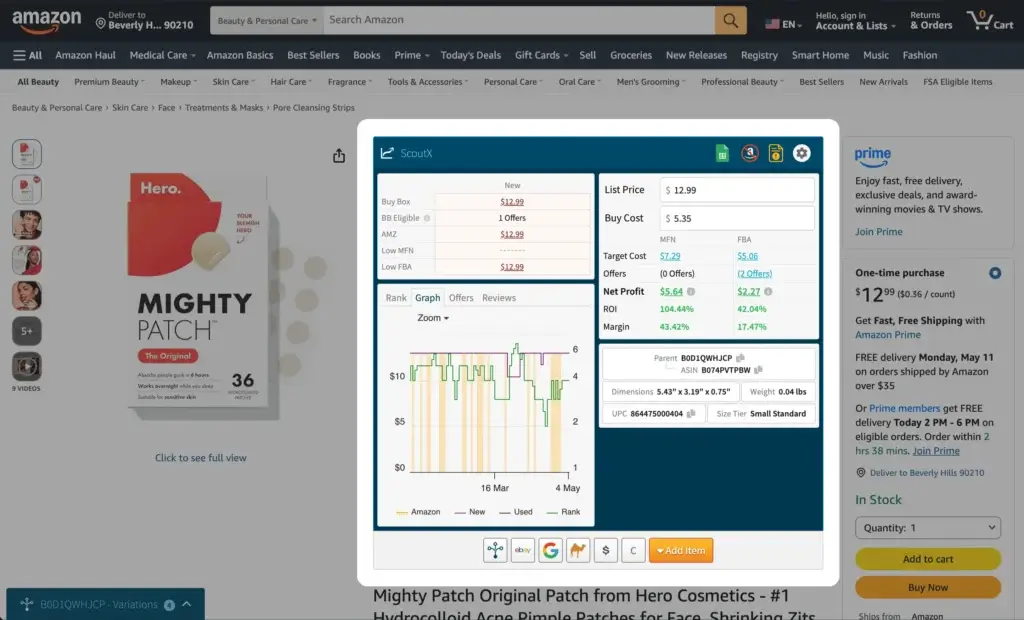
ScoutX is a Chrome extension built specifically for Amazon product research. It installs into your browser and turns every Amazon product page into a full sourcing workstation, surfacing the data you’d otherwise have to hunt for across multiple tools.
The extension pulls 60+ data points instantly: ROI calculations, sales rank, category data, FBA and FBM profit breakdowns, and all Amazon fees factored in upfront. The variation viewer lets you compare prices and margins across every size, color, and bundle option side by side without opening each variant separately. Restriction checks happen right on the product page, so you know immediately if you can sell in a given category before you go any further.
It also connects to Google Sheets for one-click data export, and includes custom research shortcuts linking directly to tools like Keepa and CamelCamelCamel. Competition visibility is built in: you see the number of sellers, their prices, and their fulfillment methods on the same page.
ScoutX is included in all Seller 365 plans starting at $69/month, alongside nine other tools covering repricing, feedback management, profit analytics, and more.
Free trial: Up to 14 days (via Seller 365)
Pricing: Included in Seller 365 at $69/month
2. AMZ Prep Middle Mile Audit Tool
Every other extension here helps you decide what to sell. This one deals with what Amazon charges to get it in. Placement fees, storage fees, and inbound freight sit in three separate reports, and almost nobody adds them up. AMZ Prep is a 3PL with 50+ fulfillment centers across six countries, and it built this audit to do the adding.
The free Amazon & Shopify Data Exporter extension sits inside Seller Central. One click each pulls the three reports you need: FBA Shipment Export, FBA Placement Fees, and Monthly Storage Fees. No hunting through report menus, no cleaning up spreadsheets. Drop those files into the upload form on the audit page, and you’re done in under two minutes.
Within 24 hours, you get a scorecard with three numbers: how many days inventory takes from your dock to Amazon check-in, what Amazon charged you in placement fees over the last 12 months, and what the Middle Mile program would save. That program is the point. Instead of splitting a shipment five ways and paying per-unit placement fees on every box, you send one consolidated load to an AMZ Prep hub and their team splits and routes it. Placement fees go to $0 because you pay by cubic foot.
Free trial/version: Free (extension, scorecard, and a 30-minute strategy call)
Pricing: Free. AMZ Prep’s Middle Mile service is quoted separately, per cubic foot, with no placement fees.
3. Jungle Scout
Jungle Scout is one of the most widely used product research tools on the market, and its Chrome extension brings that research directly into Amazon search results and product pages. The key feature is AccuSales, a proprietary algorithm that analyzes over a billion data points daily to produce monthly and daily sales estimates for any product you’re looking at.
Free trial: 7-day money-back guarantee
Pricing: Starter plan starts at $49/month (monthly billing) or $29/month (annual billing)
4. Helium 10
Helium 10’s Chrome extension is one of the most feature-dense options on this list, trusted by over 4 million sellers. The flagship tool inside the extension is Xray, which surfaces estimated sales, revenue, BSR trends, and review velocity right on the page. The Profitability Calculator factors in FBA fees, shipping, and other costs for a real-time margin read.
Free trial/version: Free version with limited usage
Pricing: Starter at $39/month (monthly billing); Platinum at $99/month (monthly billing); Diamond at $279/month (monthly billing)
5. Keepa
Keepa does one thing and does it well: it embeds detailed price history charts directly into every Amazon product page you visit, automatically, with no extra clicks. The charts are interactive and can display up to 18 different price metrics simultaneously, covering Amazon prices, third-party seller prices, and used prices across various conditions.
Free trial/version: Basic Chrome extension is free
Pricing: Premium Data subscription at approximately €19/month
6. AMZScout PRO
AMZScout PRO delivers product analysis directly on Amazon’s search results pages. For any product you’re looking at, it pulls monthly sales estimates, BSR history, review analysis, listing quality scores, and competitor price data, all in one panel.
Free trial/version: 10-day money-back guarantee
Pricing: PRO Extension at $259.99/year or $799.99 for lifetime access; Seller’s Bundle at $49.99/month
7. AMZScout Stock Stats
A separate AMZScout tool, the Stock Stats extension (also called Amazon Stock Level Spy) is focused on a specific and often underused competitive signal: how much inventory your competitors are holding.
The extension shows total and average stock levels across all sellers on a given listing, including which sellers are carrying the same product as you. Knowing when a competitor is running low on stock lets you anticipate a pricing opportunity or an increase in your own Buy Box time. It’s a lightweight tool that pairs well with a broader research setup rather than standing alone.
Free trial/version: Free to use
Pricing: Free; also available as part of the AMZScout Seller’s Bundle
8. SellerApp
SellerApp’s Chrome extension is particularly useful for getting a fast read on FBA fee estimates for any product you’re considering. It calculates FBA costs upfront, factoring in product size, weight, and fulfillment type, so you can assess profitability before committing.
Free trial/version: Free plan with limited access; 7-day trial for paid plans
Pricing: Pro Lite at $49/month (monthly billing) or $39/month (annual billing); Professional at $99/month (monthly billing) or $49/month (annual billing)
9. Amazon KW Index and Rank Tracker (AMZDataStudio)
Keywords are one of the primary levers for visibility on Amazon, and this extension from AMZDataStudio focuses entirely on tracking them. For any ASIN, you can check the ranking position and indexing status of any keyword, along with monthly search volume data for both your own and competitors’ target terms.
Free trial/version: Free version available
Pricing: Pro Monthly at $28/month; Pro Lifetime at $197 (one-time)
10. Titans Pro Niche Finder and Amazon Search Suggestion Expander
Self Publishing Titans offers two Chrome extensions built with KDP sellers in mind, but the underlying functionality is broad enough to be useful for any Amazon seller doing keyword and niche research. The Niche Finder surfaces niche market data including average BSR, average pricing, average review count, and a composite niche score. The Search Suggestion Expander extends Amazon’s autocomplete results to reveal a wider range of keyword variations.
Free trial/version: Free version available for both extensions
Pricing: Titans Pro at $14/month (monthly billing) or $97 lifetime; Titans Elite at $24/month (monthly billing) or $499 lifetime
11. DS Amazon Quick View
DS Amazon Quick View is a lightweight, fast extension that adds product rank, category, and variation data directly to Amazon search result listings without you needing to click into each product page. It’s less about deep analysis and more about quick filtering: you can scan a page of results and immediately see which items have strong rank signals and which aren’t worth a closer look.
Free trial/version: Free
Pricing: Free
12. PriceBlink
PriceBlink is aimed at arbitrage sellers who spend time browsing other ecommerce marketplaces looking for products to resell on Amazon. When you land on a product page on any supported retail site, the extension automatically searches across thousands of merchants for the same item, surfacing the lowest available prices and any active coupons.
Free trial/version: Free
Pricing: Free
13. MozBar
MozBar is the odd one out on this list: it’s an SEO tool, not an Amazon-specific product. But it’s worth including because it surfaces information about the external links pointing to any webpage, including Amazon product and category pages. For sellers thinking about off-Amazon traffic, driving external links, or evaluating affiliate and influencer partnership opportunities, understanding where your competitors’ external traffic comes from is genuinely useful intelligence.
Free trial/version: Free version available; 30-day free trial for Moz Pro
Pricing: Moz Pro starts at $99/month (monthly billing) or $79/month (annual billing)
Get more out of your browser and your business
A Chrome extension improves your research speed on one page at a time. But the broader goal is building an operation where sourcing, pricing, fulfillment, and profit tracking all work together without the friction of switching between disconnected tools.
That’s what Seller 365 is built for. Ten tools in one subscription, covering everything from product sourcing (including ScoutX) to automated repricing with SmartRepricer, review management with FeedbackWhiz, and profit analytics with FeedbackWhiz Profits and InventoryLab Accounting. All for $69/month.
Start your 14-day free trial of Seller 365 and see how much less complicated your stack can be.
Frequently asked questions
How do I choose which Chrome extensions are right for me?
Start by identifying the parts of your Amazon workflow that take the most time or feel the most uncertain: sourcing decisions, fee calculations, keyword research, competitor monitoring. Match those pain points to the tools on this list. Most have free versions or trial periods, so you can test them before committing to a paid plan. Also consider whether you’re already paying for a broader platform, since some of these functions overlap with tools you might already have. ScoutX, for example, is included in Seller 365 alongside nine other tools, which can make standalone subscriptions unnecessary.
How often do Chrome extensions update?
Chrome checks for extension updates every few hours by default and installs them automatically. To check which version of an extension you’re running, go to the three-dot menu, select “Extensions,” then “Manage Extensions,” and click “Details” on any extension. To trigger a manual update, enable “Developer mode” at the top right of the Extensions page, then click the “Update” button that appears.
Do I need technical knowledge to use these tools?
No. The extensions on this list are built to be accessible without any technical background, though you do need to be familiar with how Amazon selling works to interpret the data they return. The data is only as useful as your ability to act on it.
Can I run multiple extensions at the same time?
You can install as many as you want, but running too many simultaneously can slow down your browser. A practical approach is to install the ones you regularly use and disable the rest when they’re not needed. Most sellers settle into a small active set based on their daily workflow.